Anchor+ Quit Sugar · What's new in 1.1
The craving is a moment. Your progress is a longer story.
Meet Anchor 1.1: a clearer Today screen, a day counter that keeps going, a private journal and optional photos. Start with seven included days, then choose Annual or Lifetime to keep the premium tools.
Madhav Mallya · AuraBridge Systems · Published 1 November 2026 · 5 minute read
At three in the afternoon, a decision made in the morning can feel surprisingly far away. The day has become busy. A familiar craving arrives. What would help now is something small enough to use in that moment.
That is the starting point for Anchor+ Quit Sugar. Version 1.1 brings the things you return to into clearer view: today's place in your journey, help when you feel tempted, and a private record you can look back on. Your first seven calendar days include the complete experience. After that, Annual or Lifetime keeps the premium tools available.
Read the narration and visual description
Three p.m. You planned to cut back on sugar. Then the craving hits.
Open Anchor. Tap “I'm tempted” for Rescue. Name the trigger, take a minute, and choose your next move.
The redesigned dashboard keeps your day and plan in view. Save a private journal entry, even after a slip. Your reset continues.
Your first seven calendar days are included. Then choose Annual or Lifetime. Find Anchor Quit Sugar on the App Store.
Visuals: an illustrative biscuit-and-coffee scene leads into real recorded Today and Rescue screens. A brief timer excerpt and a next-step choice are followed by the dashboard and a separate daily reflection, with a fictional note and the native saved confirmation. No measured craving reduction or health result is shown.
Personal habit support, not medical advice. This is an edited demonstration with fictional data, not a customer's experience.
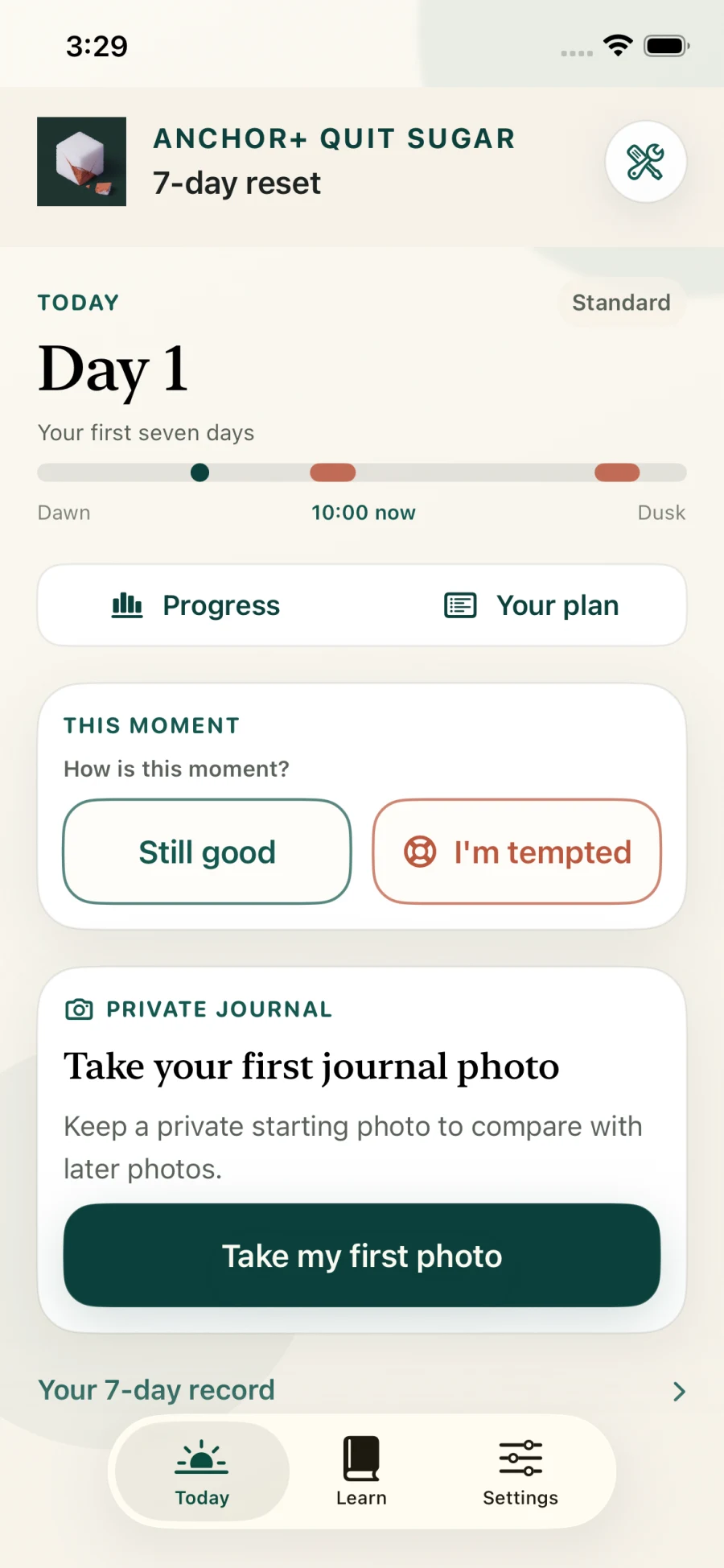
A Today screen that gives the next step some space.
The redesigned dashboard starts with your day. Progress and Your plan have clear places near the top. The moment card asks a direct question: “How is this moment?” Its two choices, Still good and I'm tempted, sit alongside each other with equal weight.
If things feel steady, save a check-in. If temptation is close, open Rescue for a pause and a practical next step. The screen makes room for both answers. A check-in records this moment; your daily reflection is where you review how the day went.
Support around a difficult hour can begin before you open the app. Choose reminder times and a sound, including the Anchor chime. Open Anchor during a selected support window for a Lock Screen Live Activity. Reminders and Live Activities are separate, and iOS controls their timing and availability.
Seven days to begin. A counter that can carry on.
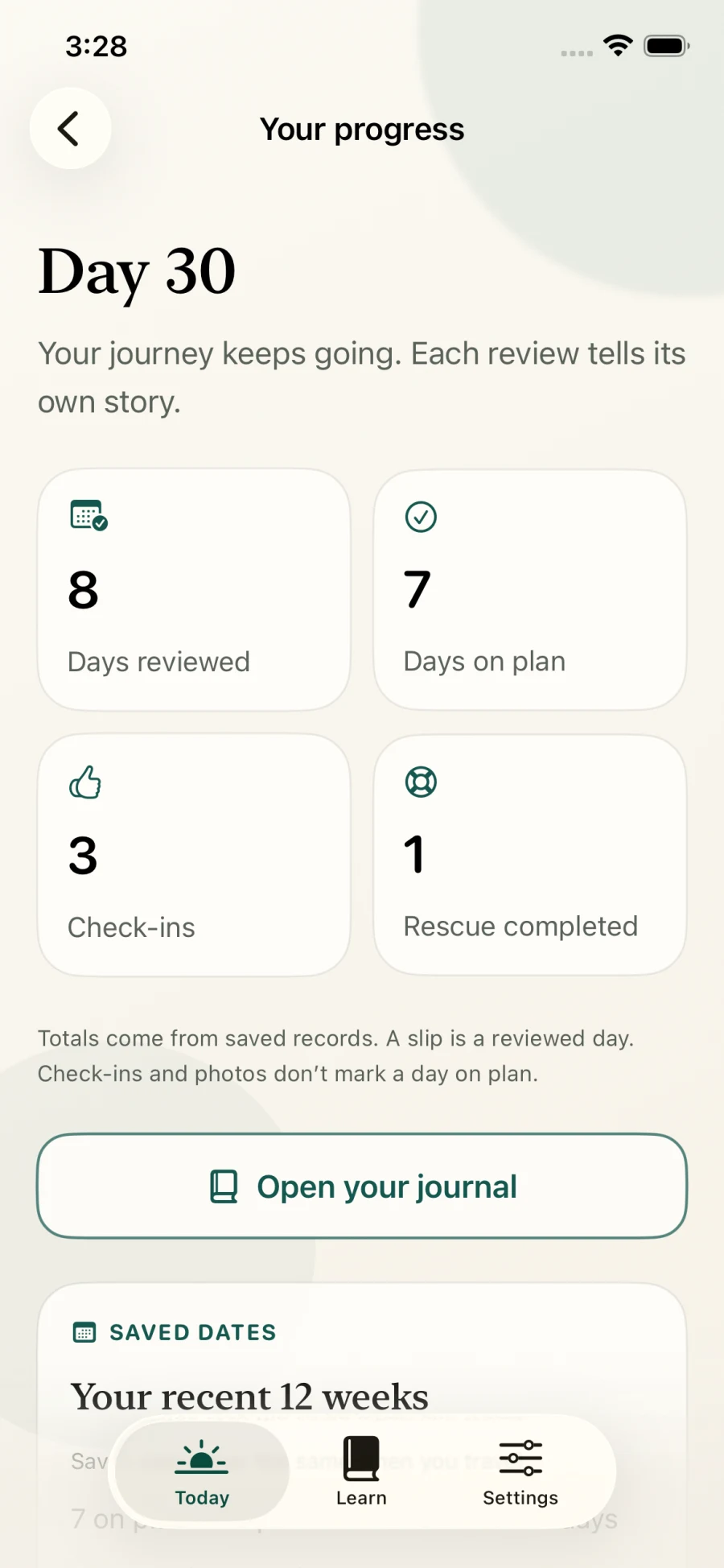
The first reset gives you a focused starting point. Your longer record need not end there. The updated day counter can continue beyond the first seven days, while Progress brings saved reviews, days on plan, check-ins and completed Rescue sessions into view.
Those numbers have different meanings. Still good adds a check-in. A photo adds a photo. Neither marks the whole day as on plan. Your reflection owns that outcome, and an honest slip does not force the reset back to the beginning.
A journal you can keep private—and take with you.
A short note can hold what a number cannot: what made an afternoon difficult, what helped, or what you want to remember tomorrow. Anchor keeps those entries on your iPhone. Optional photos can sit alongside your record, and you can compare saved dates side by side.
Photos are your choice throughout. They are not a requirement for a successful day. Lighting, framing and expression affect appearance; a comparison is a personal record, not a measurement of health or sugar intake. Anchor does not analyse the images for health changes.
When you want a copy, export the records you choose in spreadsheet or structured formats, with photos where selected. Keep an exported copy before uninstalling: deleting the app may remove its local journal. Nothing is uploaded to AuraBridge Systems for you to keep this record.
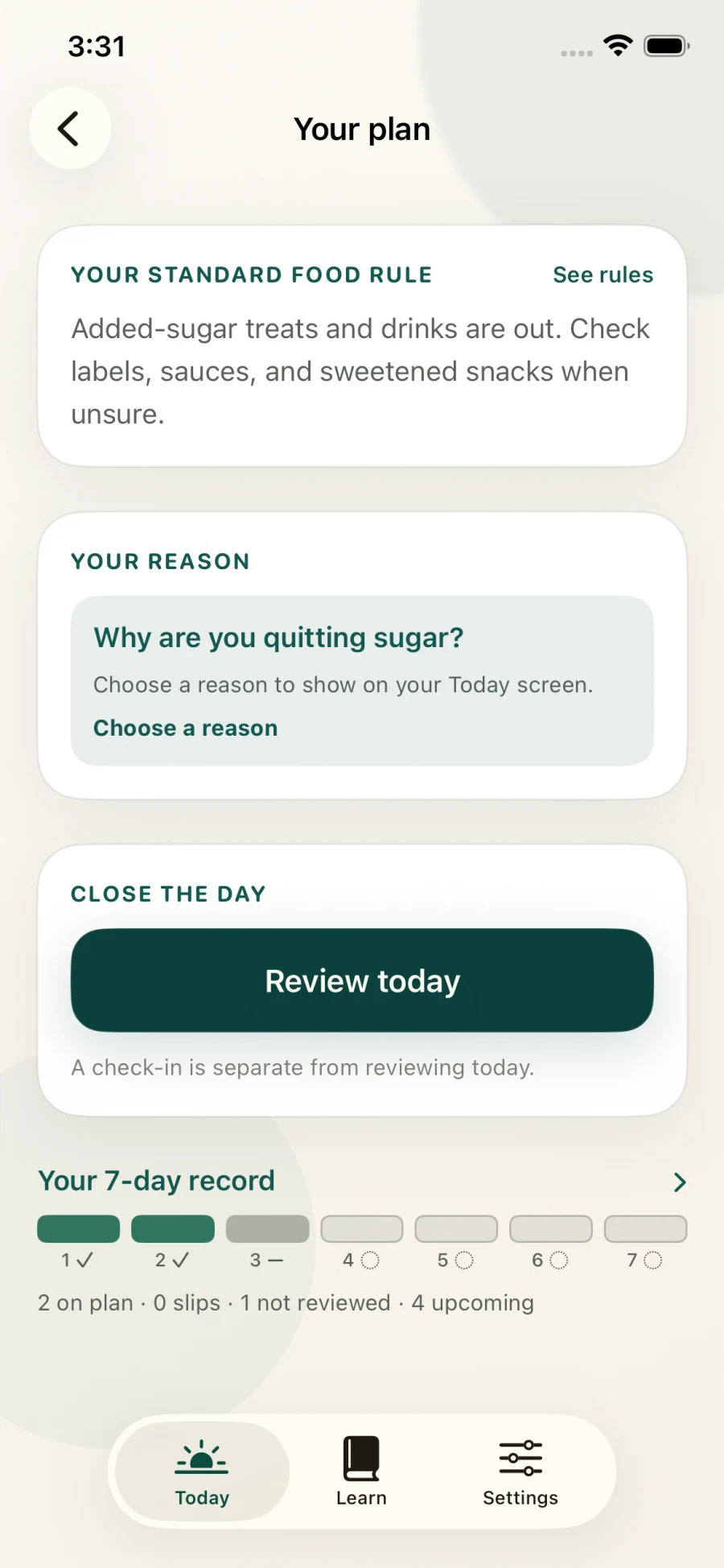
Your plan belongs beside your day.
Your plan puts your food rule, personal reason and daily review in one place. You can return to the boundary you chose without treating every check-in as a new decision. The seven-day record also distinguishes reviewed days, slips, unreviewed days and days still ahead.
Choose a plan that fits how you want to continue.
Start with the complete first seven calendar days. This included period does not automatically start a subscription. After day seven, both paid choices continue new journal entries and photos, comparisons, exports, Rescue, reminders, selected-time Lock Screen support and additional resets.
First seven calendar days
Included
Get to know the full experience before choosing paid continuation.
Anchor+ Annual
$4.99/year
A yearly subscription for continued access. Renews annually unless cancelled through Apple.
Anchor Lifetime
$14.99 once
A one-time purchase when you prefer ongoing access without annual renewal.
US reference prices. Apple shows your local price and terms before purchase.
| Choice | Price | When it fits |
|---|---|---|
| First seven calendar days | Included | Get to know the full experience before choosing paid continuation. |
| Anchor+ Annual | $4.99/year | A yearly subscription for continued access. Renews annually unless cancelled through Apple. |
| Anchor Lifetime | $14.99 once | A one-time purchase when you prefer ongoing access without annual renewal. |
If you decide not to continue, your saved records remain available to view or delete, and Learn remains available. The upgrade keeps the tools for adding to your journey; it does not take away the record you already made. Price, currency, taxes and terms on Apple's purchase confirmation are authoritative.
One moment, then the next.
Anchor does not ask you to turn eating into a food log. It gives a moment of temptation somewhere to go, and an ordinary day somewhere to be remembered. No Anchor account, ads, analytics or cross-app tracking. Your records stay on your device unless you choose to export or share them.
Find Anchor+ Quit Sugar on the App Store, or explore the app and its plans. Version 1.1 is now listed in the US App Store; availability in other storefronts may update separately.
Anchor is personal habit support, not medical advice, diagnosis or treatment. All app screens shown here are simulator captures from build 73 with sample data, not personal journal records.